VectorBT AI Skills to Build and Backtest Trading Strategies Faster Without Writing a Single Line of Code
If someone told me six months ago that anyone could build time series momentum strategies, benchmark them against indices, run multi-asset portfolio backtests, test trend following and trend reversal ideas, or even pair trading strategies — all by just talking to an AI agent — I would have laughed.
I’m not laughing anymore.
I created something called VectorBT Backtesting Skills — a set of AI skills that let you backtest across multiple asset classes (Indian, US, and Crypto markets) with realistic commissions including charges and statutory fees. Within minutes of loading these skills into an AI coding agent, I was running institutional-grade backtests that would have taken hours to code manually. No Python. No debugging. No StackOverflow rabbit holes.
And here’s what really blew my mind, now you can actually have a conversation with your backtesting results. Compare different strategies side by side, ask “how good is this Sharpe ratio?”, understand what the metrics mean, and get a plain-language summary of the pros and cons of your trading strategy. Just talk to your strategy and the AI breaks down every metric for you.
Just plain English instructions like:
“Backtest a simple 10 and 30 EMA crossover on State Bank of India, NSE, daily timeframe, for the last 5 years”
And the AI wrote the code, executed it, fetched real market data, applied realistic transaction costs, benchmarked against NIFTY 50, generated an equity curve, produced a QuantStats tearsheet with 30+ metrics — and then explained the results in plain language so even a beginner could understand them.
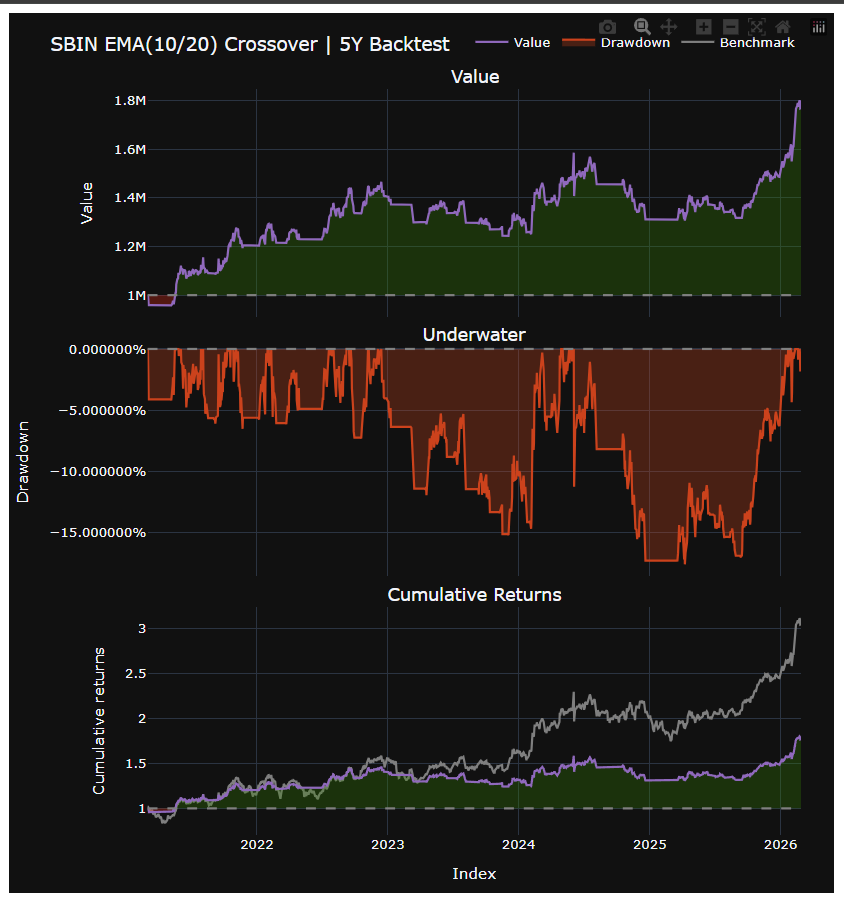
Here’s what happened next.
What Are “Skills” and Why Should You Care?
Skills are a new concept introduced by Anthropic and curated by Vercel at https://skills.sh. Think of them as deep domain expertise that you plug into AI coding agents.
Unlike regular prompts or ChatGPT conversations, skills are structured instruction sets that teach an AI agent how to be an expert in a specific domain. They contain best practices, rules, templates, and guidelines that ensure the AI produces high-quality, production-ready output every single time.
The VectorBT Backtesting Skills package (https://github.com/marketcalls/vectorbt-backtesting-skills)
- 5 user-invocable skills — setup, backtest, optimize, quick-stats, strategy-compare
- 12 production-ready strategy templates — EMA Crossover, RSI, Supertrend, MACD, Donchian, and more
- 20 modular rule files — covering everything from transaction costs to walk-forward analysis
- 100+ technical indicators via TA-Lib and OpenAlgo
And it works with 40+ AI coding agents — Claude Code, Cursor, Codex, GitHub Copilot, Gemini CLI, Windsurf, Cline, Roo Code, and more.
The 5-Minute Setup That Changed Everything
Installation is one command:
npx skills add marketcalls/vectorbt-backtesting-skills
Then inside your AI agent:
/setup
That’s it. The AI detects your operating system, creates a Python virtual environment, installs TA-Lib (including the C library), installs VectorBT, Plotly, QuantStats, and 75+ other packages, creates the backtesting folder structure, and configures your API keys.
A setup process that used to take me 30 minutes of googling TA-Lib installation errors — done in one command.
My First Backtest: EMA Crossover on SBIN
I typed:
/backtest simple 10 and 20 ema crossover strategy in SBIN,
Daily timeframe for the last 5 years.
The AI:
- Created a backtesting/ema_crossover/ folder
- Wrote a complete Python script using TA-Lib indicators (not VectorBT built-ins — the skill enforces this)
- Fetched 5 years of SBIN daily data from OpenAlgo
- Applied realistic Indian delivery equity fees (0.111% + Rs 20/order) — automatically
- Cleaned signals with ta.exrem() to remove duplicate entries
- Ran vbt.Portfolio.from_signals() with proper whole-share sizing
- Fetched NIFTY 50 as benchmark
- Printed a comparison table
- Generated equity curve + underwater plot
- Exported trades to CSV
- Created a QuantStats HTML tearsheet
- Explained the results in plain English
The explanation looked something like this:
* Total Return: Your strategy made 45.23% while NIFTY 50 made 32.10%
  -> BEAT the market by 13.13%
* Max Drawdown: -12.34% — the biggest drop from peak
  -> On Rs 10,00,000 capital, worst temporary loss = Rs 1,23,400
* Sharpe Ratio: 1.45 (return per unit of risk, >1 decent, >2 excellent)
If you’re a beginner, you don’t need to know what a Sharpe ratio is. The AI tells you whether your number is good or bad. If you’re experienced, you get the full QuantStats tearsheet with 30+ institutional metrics.
Where It Gets Crazy: Multi-Asset Portfolio Backtesting
I wanted to test a Supertrend strategy across multiple stocks with custom allocation. Here’s what I typed:
“Backtest a simple Supertrend strategy with parameters 3 and 10 on HDFC Bank, ICICI Bank, State Bank of India, Reliance, Infy, and Tata Steel. Allocation: SBIN 20%, Reliance 30%, Infy 10%, Tata Steel 40%. Daily timeframe, last 5 years. Also add a benchmark column for HDFC Bank fixed deposit at 6.45%.”
The AI built a complete multi-asset portfolio backtest. Individual equity curves for each stock. Combined portfolio performance. Benchmark comparison against NIFTY. And that fixed deposit comparison column I asked for? It added it — showing that my strategy wasn’t even beating a bank FD.
That’s the kind of brutal honesty you need before risking real capital.
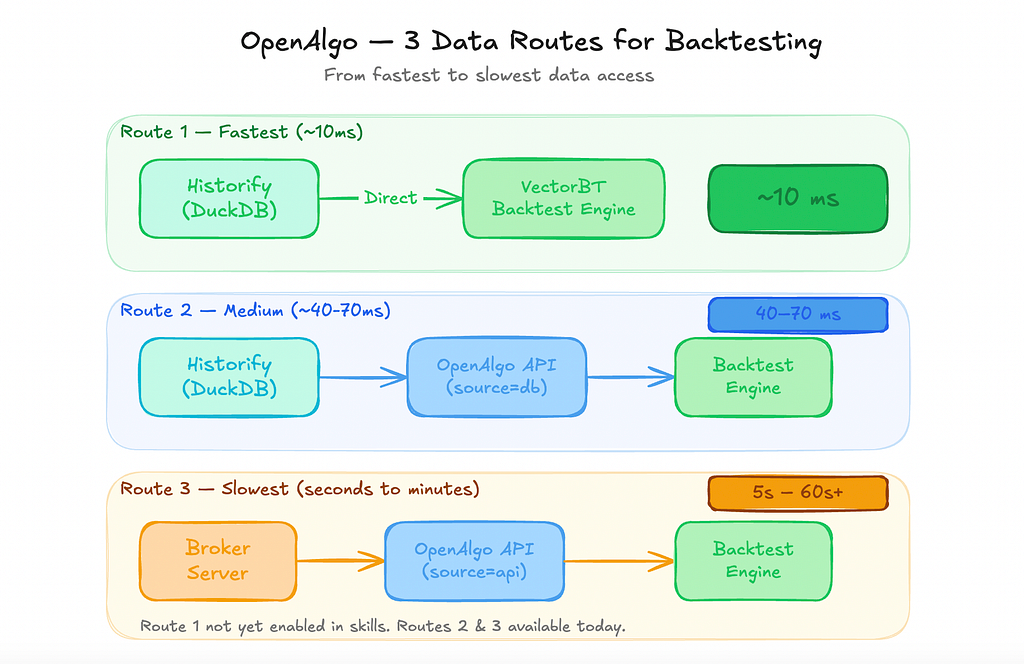
The Three Data Routes
Route 1 — Fastest (~10ms)
Historify (DuckDB) → Direct → VectorBT Backtest Engine
~10 ms
Route 2 — Medium (~40–70ms)
Historify (DuckDB) → OpenAlgo API (source=”db”) → Backtest Engine
40–70 ms
Route 3 — Slowest (Seconds to Minutes)
Broker Server → OpenAlgo API (source=”api”) → Backtest Engine
5s — 60s+
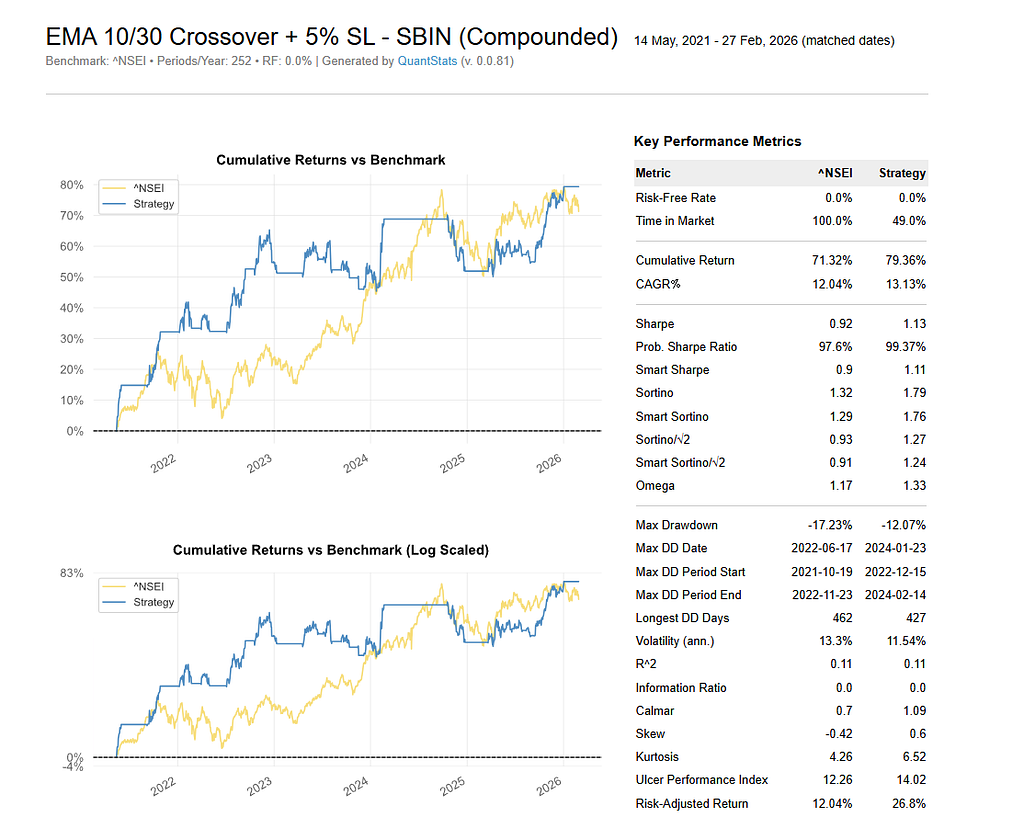
Adding Stop-Loss and Take-Profit — In English
After my first backtest, I wanted to add risk management:
“Can you change the backtest with a 5% stop loss?”
Done. New equity curve. New metrics. Drawdown reduced significantly.
“Can you also add a 20% target?
Done again. The AI showed me a before/after comparison — without stop loss vs. with 5% SL and 20% TP. It highlighted that while returns decreased, the drawdown duration dropped drastically.
No parameter documentation hunting. No VectorBT API reference lookup. Just English.
The QuantStats Tearsheet
Every backtest generates an HTML tearsheet via QuantStats. This isn’t a toy — it’s the same kind of report institutional quants produce:
- Cumulative returns vs benchmark
- Rolling Sharpe and Sortino ratios
- Monthly returns heatmap
- Drawdown periods visualization
- Worst 10 drawdowns ranked
- Year-over-year performance breakdown
- Distribution of daily returns
- Monte Carlo simulations
- 30+ risk and return metrics
All generated automatically. No extra code. No extra prompts.
Beyond Backtesting: Dashboards and Indicators
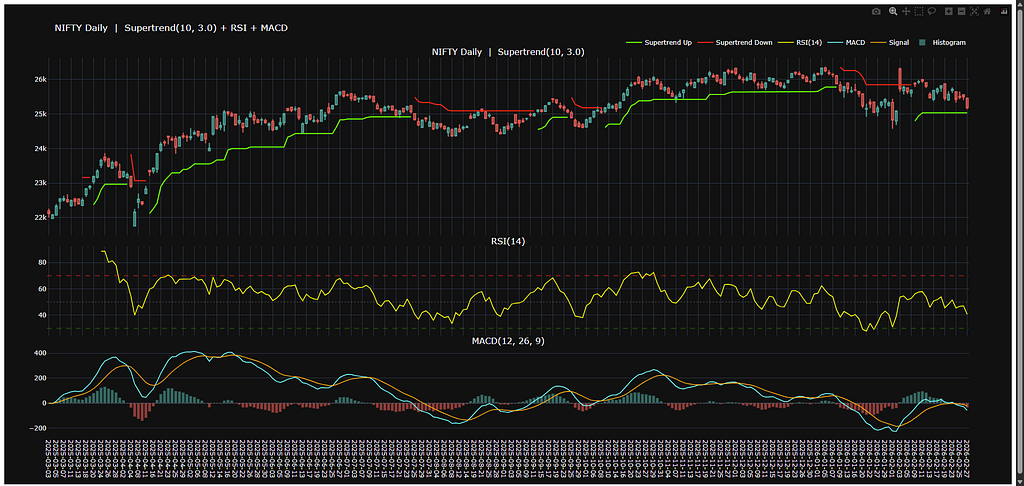
The skills don’t stop at backtesting. There’s a companion Indicator Skills package (https://docs.openalgo.in/skills/indicators) that lets you:
Build Plotly charts with custom indicators:
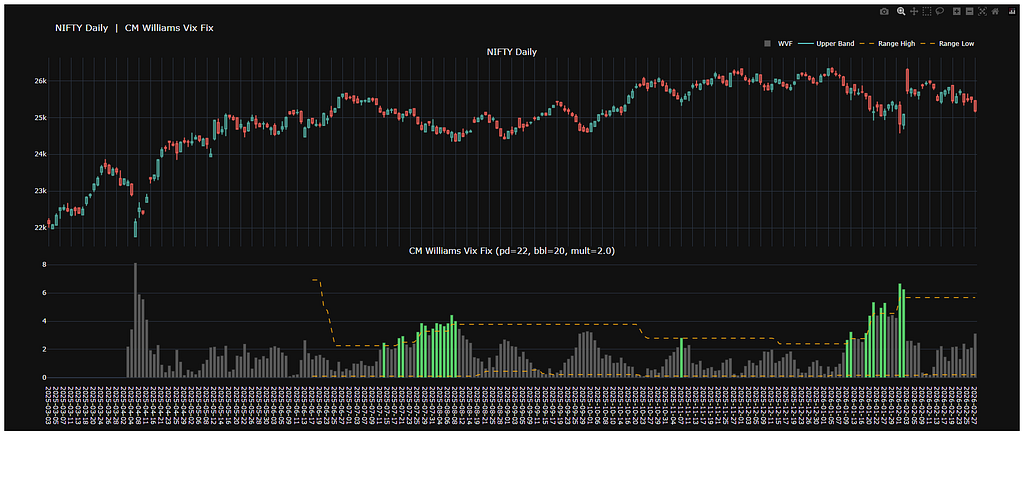
“Create a Plotly chart of SBIN daily timeframe with Supertrend (3,10), RSI, and MACD”
Build Streamlit dashboards:
“Create a Streamlit dashboard showing sector returns for the last 1 week, 1 month, 3 months, 1 year, 3 years, and YTD for the top 10 NSE sectoral indices, in histogram format”
Replicate TradingView indicators:
I literally copied the name “CM Williams VIX Fix” from TradingView, pasted it into the prompt, and the AI recreated the indicator using OpenAlgo’s 100+ built-in indicators. The values matched exactly.
What Makes This Different from ChatGPT?
I know what you’re thinking. “I can just ask ChatGPT to write backtesting code.”
You can. And here’s what you’ll get:
- Code that uses vbt.MA.run() instead of TA-Lib (wrong approach for serious backtesting)
- Zero fees in the portfolio simulation (makes every strategy look profitable)
- No signal cleaning (duplicate entries that corrupt your results)
- No benchmark comparison
- No QuantStats tearsheet
- Fractional shares in equity backtests (not realistic)
- No plain-language explanation
The skills enforce 20 rules and best practices that prevent these mistakes. Every backtest automatically gets:
- TA-Lib indicators (mandatory — never VectorBT built-ins)
- Signal cleaning with ta.exrem()
- Market-specific realistic fees (Indian delivery: 0.111% + Rs 20, US stocks: ~0.01% + $1, Crypto spot: 0.1%)
- Whole-share sizing (min_size=1, size_granularity=1)
- Benchmark comparison table
- Plain-language explanation
- QuantStats tearsheet
The difference between a ChatGPT backtest and a Skills-powered backtest is the difference between a hobby project and a production-grade analysis.
The Cost Question
Here’s the practical breakdown:
Google Gemini CLI — Free tier available. Best for getting started, running around 5–10 strategies per day, and experimenting without spending anything.
OpenAI Codex — $20/month. Solid execution, reliable for daily use, and a good balance between cost and performance.
Claude Code — $20–200/month. Excellent slash command support, with the $200 plan offering effectively unlimited usage for heavy users.
For a trader just starting out, $20/month on Codex or Claude Code’s base plan gives you more backtesting firepower than most retail quant platforms that charge $100+/month.
The Bigger Picture
This isn’t just about backtesting. This is about what happens when domain expertise becomes installable.
Today it’s backtesting skills. Tomorrow it could be:
- Execution skills — automated straddles, adjustments, portfolio rebalancing
- Risk management skills — real-time position monitoring, Greeks calculation
- Research skills — screening, sector rotation, factor analysis
The VectorBT Backtesting Skills repository is open source. Anyone can contribute. Anyone can create their own skills for their domain.
We’re hitting 100,000 downloads of OpenAlgo next week. The community is building. The skills ecosystem is growing.
The gap between “idea” and “backtest” just collapsed to a single sentence.
Getting Started
# Install the skills
npx skills add marketcalls/vectorbt-backtesting-skills
# Inside your AI agent
/setup
/backtest ema-crossover SBIN NSE D
Three commands. That’s the entire barrier to entry.
Links:
- Repository: https://github.com/marketcalls/vectorbt-backtesting-skills
- Backtesting Skills Docs: https://docs.openalgo.in/skills/backtesting
- Indicator Skills Docs: https://docs.openalgo.in/skills/indicators
- Install OpenAlgo: https://docs.openalgo.in/installation-guidelines/getting-started
Rajandran R is the founder of OpenAlgo, an open-source algorithmic trading platform supporting 30+ Indian brokers. He writes about quantitative trading, AI-assisted development, and market microstructure at marketcalls.in.
