Why opening the option chain doesn’t break your live algo, and why your data-capture script doesn’t have to fight your GUI for a tick.
If you trade on an Indian broker, you’ve probably bumped into this wall: every broker hands you a thin little websocket budget, usually one or two connections per login, capped at a thousand or so symbols total. Burn through it, and the broker silently drops your subscriptions. Worse, every separate piece of software you run your dashboard, your stoploss watcher, your data recorder wants its own slice of that budget.
So the question becomes: how do you let your GUI, your live algorithm, and your custom Python script all see the same ticks, in real time, without each one of them re-opening a new websocket and torching your quota?
That’s the problem OpenAlgo’s websocket layer was built to solve. And once you understand the four moving pieces, the whole thing is surprisingly elegant.
The picture, before the words
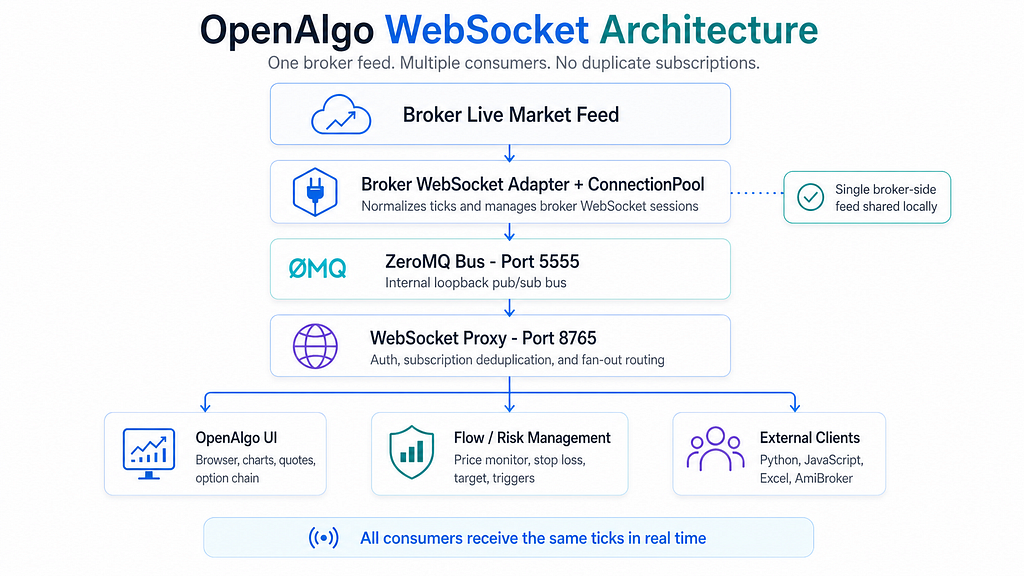
There are exactly four boxes in this diagram, and the entire design hinges on one rule: the broker sees one consumer. Everyone else taps in downstream.
Let’s walk through it.
— -
## The 30-second version
OpenAlgo connects to your broker’s live market feed once. Behind that single connection sits a small in-process message bus (ZeroMQ) and a unified WebSocket proxy. Every consumer in your stack — the browser UI, the Flow engine that watches your stoplosses, your own external scripts — subscribes through that proxy. The proxy keeps a registry of who wants what, and routes each tick to exactly the right set of clients.
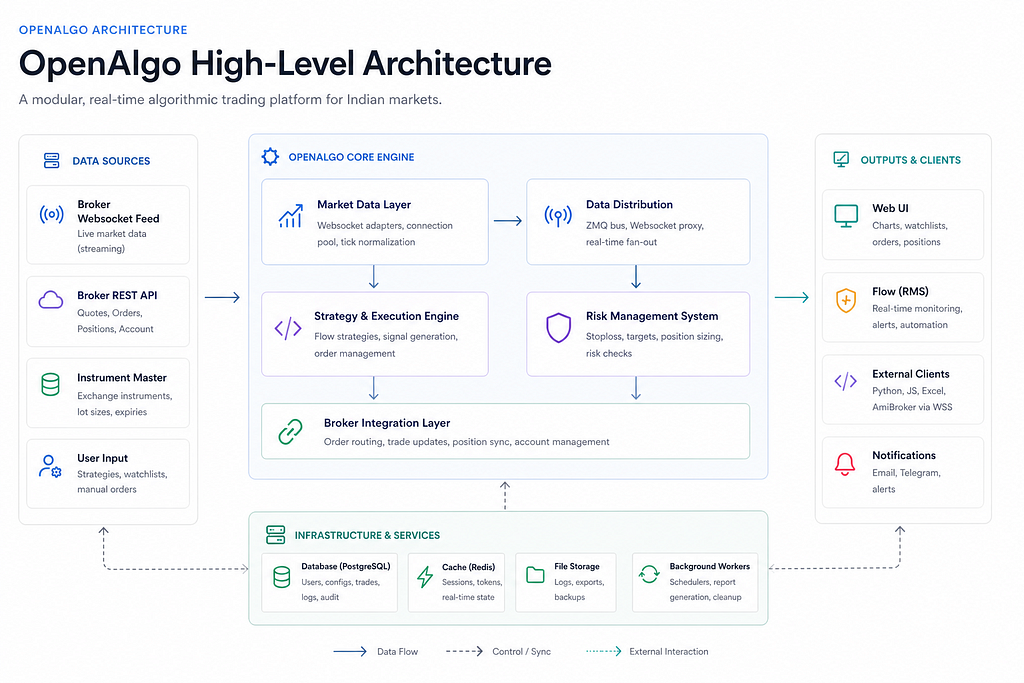
The trick is that all of them subscribing to NIFTY counts as one broker subscription. Not three. Not ten. One.
This is what makes it possible to have your option-chain page open while your live algo is running while your Python script is recording ticks to disk — and not blow past your broker’s symbol cap.
— -
The four moving pieces
1. The Broker WebSocket Adapter
Every broker has its own websocket protocol, its own login flow, and its own peculiar way of describing market depth. The **broker adapter** is the only code in OpenAlgo that knows about those quirks. It speaks the broker’s dialect, and translates everything into a standard, broker-agnostic tick format on the way out.
Once a tick has been parsed and normalised, it leaves the adapter looking the same regardless of which broker it came from. That’s how the rest of the system can stay simple: it doesn’t care whether you’re on Zerodha, Flattrade, Kotak, or any of the other 24+ brokers OpenAlgo supports.
The adapter doesn’t know who’s listening. It just publishes.
### 2. ConnectionPool
The broker says “1000 symbols per websocket”. You need 2400. Now what?
The **ConnectionPool** wraps the broker adapter and makes that limit invisible to everyone above it. When the first connection fills, the pool transparently opens a second one. When that fills (and the broker permits a third login), it opens a third. From the outside, it still looks like one big pipe.
But here’s where it gets interesting. The pool isn’t just dumb capacity routing. It implements a mode hierarchy: Depth ≥ Quote ≥ LTP. If the pool is already streaming Depth for `NIFTY28APR2425000CE`, and a new consumer asks for LTP on the same strike, the pool doesn’t open a new subscription. It just notes the new subscriber and returns success. The data is already flowing — the broker is sending more than enough.
When the original Depth subscriber leaves but the LTP subscriber stays, the pool **downgrades** the broker subscription rather than fully removing it. And if that downgrade fails, it rolls back cleanly so you’re never left in a half-subscribed state.
This is the kind of code that exists because someone got bitten by a real production bug. Not theoretical.
3. ZeroMQ — the in-process post office
Between the adapter and the proxy sits the simplest possible piece of infrastructure: a ZeroMQ publish/subscribe bus on `127.0.0.1:5555`. Loopback only. Never exposed off the machine.
The adapter publishes every normalised tick onto this bus, tagged with a topic string like `NSE_RELIANCE_QUOTE`. Anything in the same machine that wants ticks subscribes to it.
Why a separate bus instead of just calling Python functions directly? Three reasons:
- Decoupling. The broker side runs at full speed. If a downstream consumer is slow, ZeroMQ drops messages for *that* consumer. Your live algo’s stoploss watcher never blocks because a browser tab is being slow.
- One-to-many fan-out for free. Adding a new consumer doesn’t require touching the broker adapter at all.
- Resilience. A crashing client doesn’t bring down the broker session.
It’s a small, deliberate piece of complexity that buys a lot of robustness.
4. The WebSocket Proxy
This is the one external endpoint, on port 8765. It’s what the browser talks to. It’s what your Python script talks to. It’s what AmiBroker, Excel, and any third-party tool talks to. And it’s where the most important rule of the entire architecture lives.
Subscriptions are keyed by `(symbol, exchange, mode)`. The first client to ask for a key triggers a real broker call. The second, third, fourth clients on the same key just get added to the recipient set. The broker is never asked twice.
When the last client on a key disconnects, only then does the proxy ask the broker to drop it.
This is the single most important thing for traders to internalise. It means:
- Opening the option-chain page does not eat your live algo’s websocket budget.
- Running a tick-recording script alongside Flow does not double your broker load.
- A second instance of your dashboard adds zero broker overhead.
## The piece nobody talks about: Market Data Service
External clients talk WSS to port 8765. The browser does too. But internally, OpenAlgo’s own Python code doesn’t speak WebSocket to itself — that would be wasteful. Instead, there’s a singleton called `MarketDataService` that sits inside the same Python process and hands out ticks directly.
Think of it as a thin facade with three jobs:
A live cache. Latest LTP, quote, and depth for every subscribed symbol, keyed by `(exchange, symbol)`. Any service can ask for `get_ltp(“NIFTY”, “NSE”)` and get an instant answer.
Priority subscribers. Subscribers register at one of four levels — CRITICAL, HIGH, NORMAL, LOW. Stoploss/target callbacks register as CRITICAL. Dashboards register as LOW. When a tick arrives, callbacks fire in priority order. Even if a heavy dashboard widget takes 50 ms to process a tick, the stoploss watcher has already been called first.
Safety gates. This is the part traders should know about even if they’ll never call this code themselves.
A background thread checks every five seconds: has the underlying websocket been silent for more than 30 seconds? If so, the service flips a flag called `_trade_management_paused`. When Flow’s stoploss engine asks “is it safe to trigger?”, the service answers `(False, “Connection lost — trade management paused for safety”)`. Stoplosses don’t fire on stale prices just because the broker’s websocket dropped for 45 seconds. They wait until ticks resume.
This is the layer that makes “the algo missed my SL because the WS dropped” something that doesn’t happen by accident. It’s a small piece of code that ages well.
The “but which features actually use this?” question
This comes up almost every time someone digs into OpenAlgo. Not every feature streams. Most of them don’t.
Streams via WebSocket:
- The UI’s live charts, quote panels, and tickers
- Flow’s price-monitor service (entry triggers)
- Flow’s executor service (stoploss/target watcher)
- Any external client you build that connects to port 8765
Polls the broker REST API (no WebSocket):
- Vol surface, GEX, IV smile, IV chart
- OI tracker, OI profile, multi-strike OI
- Straddle chart, custom straddle, option Greeks
- Snapshot quotes, funds, holdings, positions, orders
Practical implication: running the vol surface does not consume your websocket symbol slots. Those features are entirely separate from your live algo’s subscription budget. They might feel slower because broker REST APIs throttle multi-quote calls more aggressively than streaming, but they do not compete.
What the architecture is missing
It would be unfair to write this without naming the gaps. The core is solid; the surface area is incomplete.
There’s no built-in tick recorder. Ticks flow through memory only. If you want to persist them to parquet or DuckDB for later analysis, you have to write a subscriber yourself.
The internal ZeroMQ bus is not a public API. Topic format and message schema aren’t versioned. External integrations are expected to use the WSS endpoint, not tap the bus directly.
There’s no per-feature toggle for stream-vs-poll routing. The decision is fixed in code. A user who wants to reserve their entire websocket budget for live trading can’t currently say “and the option chain should never use it.”
There’s no short rolling tick buffer. When the safety gate releases after a stale period, the missed ticks are simply gone. A bounded ring buffer would let resume logic be smarter.
These are all additive — nothing in the current design has to be torn out to add them. And honestly, the fact that the bones are in shape means the next layer of features can be built without rewriting the core.
Why this matters
If you take only one thing away from this, take this: OpenAlgo’s websocket layer is designed for the assumption that you will run multiple consumers. That’s the default, not an edge case.
The deduplication, the connection pooling with mode hierarchy, the priority subscribers, the safety gates around trade management — none of these are necessary if you’re running a single small dashboard. They’re all there because real trading systems have a GUI, a strategy engine, an alert pipeline, and a data archive, all wanting the same feed at the same time.
The architecture says: go ahead, run all of them. The broker only sees one consumer. Everyone else taps in downstream.
That’s the whole point.
OpenAlgo is open-source and self-hosted. The full architecture documentation lives in the project’s `/docs` folder. If you’ve got opinions on what should come next — built-in capture, a versioned external bus, per-feature toggles — those are the conversations happening in the GitHub issues right now.
