Seasonality is one of the most underrated edges in the market. While most traders obsess over indicators, chart patterns, and earnings reports, few take the time to study the calendar. Yet history shows that certain months consistently favor bulls or bears — and this pattern repeats across indices, sectors, and individual stocks.
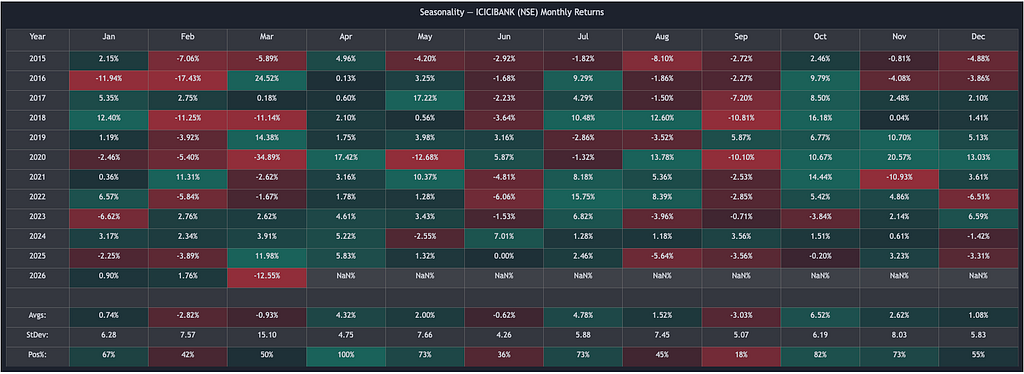
In this tutorial, we’ll explore what seasonality is, why it matters, and how to build a TradingView-style seasonality heatmap in Python using the OpenAlgo SDK and Plotly.
What is Seasonality?
Seasonality refers to the tendency of financial markets to exhibit recurring patterns at specific times of the year. These patterns emerge from a mix of structural, behavioral, and institutional factors that repeat on a calendar cycle.
For example, you may have heard of the classic Wall Street adage:
“Sell in May and go away.”
This isn’t just folklore. Data across decades and geographies shows that the May–October period tends to underperform the November–April period. Seasonality captures exactly these kinds of tendencies — not as guarantees, but as statistical tilts that can inform better decision-making.
Why Does Seasonality Matter?
1. It Reveals Hidden Probabilities
When you look at a stock’s monthly return heatmap over 10+ years, you start to see structure where there appeared to be randomness. A month that has been positive 80% of the time across a decade isn’t a coincidence — it’s a signal worth paying attention to.
2. It Improves Trade Timing
Imagine you have a bullish thesis on a stock. Seasonality data can help you decide when to enter. If the stock historically rallies in October and dips in September, you might time your entry at the September dip rather than chasing the October move.
3. It Adds a Layer of Confluence
No single tool should drive your trading decisions. But when your technical setup, fundamental thesis, and seasonal tendency all align — that’s confluence. Seasonality acts as a confirmation layer that increases conviction.
4. It Helps with Risk Management
Months with historically high standard deviation warn you to expect volatility. Months with low positive percentages signal caution. This information helps you size positions appropriately and set realistic expectations.
5. It Works Across Asset Classes
Seasonality isn’t limited to equities. Commodities (like crude oil and gold), currencies, and even crypto markets exhibit seasonal patterns driven by harvest cycles, fiscal year-end flows, holiday spending, and institutional rebalancing.
Key Metrics in Seasonal Analysis
A proper seasonality study goes beyond just looking at average returns. Here are the three metrics that matter:
Average Return (Avgs): The mean monthly return across all years. This tells you the directional bias — whether a month tends to be positive or negative on average.
Standard Deviation (StDev): The dispersion of returns around the average. A high StDev means the month is volatile and unpredictable, even if the average looks attractive. A low StDev with a positive average is the sweet spot.
Percent Positive (Pos%): The percentage of years in which the month delivered a positive return. This is arguably the most actionable metric. An average of +5% means little if the month was positive only 40% of the time — it could be skewed by one outlier year. But a Pos% of 80%+ with even a modest average suggests a reliable seasonal tendency.
Building a Seasonality Heatmap in Python
Let’s build a seasonality heatmap that mirrors TradingView’s built-in Seasonality indicator — complete with the same dark theme, color-coded cells, and summary statistics.
Prerequisites
Install the required packages:
pip install openalgo plotly pandas numpy
Make sure your OpenAlgo application is running locally at http://127.0.0.1:5000 and you have a valid API key.
The Complete Code
import pandas as pd
import numpy as np
import plotly.graph_objects as go
from openalgo import api

# ─── Configuration ───────────────────────────────────────────────
API_KEY = "your_api_key_here"
HOST = "http://127.0.0.1:5000"
SYMBOL = "ICICIBANK"
EXCHANGE = "NSE"
START_YEAR = 2015
COLOR_CUTOFF = 10  # max intensity cutoff (%)
# TradingView color theme
POS_COLOR = (8, 153, 129)    # #089981
NEG_COLOR = (242, 55, 69)    # #F23745
BG_COLOR = "#1e222d"
HEADER_BG = "rgba(128,128,128,0.2)"
TEXT_COLOR = "#d1d4dc"
LINE_COLOR = "rgba(128,128,128,0.3)"
MONTH_NAMES = ["Jan", "Feb", "Mar", "Apr", "May", "Jun",
               "Jul", "Aug", "Sep", "Oct", "Nov", "Dec"]

def calc_cell_color(value, cutoff=COLOR_CUTOFF):
    """Calculate cell background color matching TradingView's gradient logic."""
    if pd.isna(value):
        return "rgba(128,128,128,0.3)"
    base = POS_COLOR if value >= 0 else NEG_COLOR
    intensity = min(abs(value) / cutoff, 1.0)
    opacity = 0.10 + intensity * 0.40
    return f"rgba({base[0]},{base[1]},{base[2]},{opacity})"

def calc_pos_pct_color(value, cutoff=50):
    """Color for Pos% row: treat (value - 50) as the signed value."""
    if pd.isna(value):
        return "rgba(128,128,128,0.3)"
    shifted = value - 50
    base = POS_COLOR if shifted >= 0 else NEG_COLOR
    intensity = min(abs(shifted) / cutoff, 1.0)
    opacity = 0.10 + intensity * 0.40
    return f"rgba({base[0]},{base[1]},{base[2]},{opacity})"

def fetch_monthly_data(client, symbol, exchange, start_year):
    """Fetch daily data and resample to monthly close prices."""
    start_date = f"{start_year - 1}-12-01"
    end_date = pd.Timestamp.now().strftime("%Y-%m-%d")
    df = client.history(
        symbol=symbol, exchange=exchange,
        interval="D", start_date=start_date, end_date=end_date
    )
    if df is None or df.empty:
        raise ValueError("No data returned from API.")
    # Resample to monthly - use last close of each month
    monthly = df["close"].resample("ME").last().dropna()
    # Drop the current incomplete month
    today = pd.Timestamp.now(tz=monthly.index.tz)
    last_complete = (today.replace(day=1) - pd.Timedelta(days=1)).normalize()
    monthly = monthly[monthly.index <= last_complete]
    return monthly

def build_seasonality_matrix(monthly_close, start_year):
    """Build year x month matrix of monthly % returns."""
    returns = monthly_close.pct_change() * 100
    years = sorted(y for y in set(returns.index.year) if y >= start_year)
    matrix = pd.DataFrame(index=years, columns=range(1, 13), dtype=float)
    for dt, ret in returns.items():
        if dt.year >= start_year:
            matrix.loc[dt.year, dt.month] = ret
    return matrix

def build_heatmap_figure(matrix, symbol, exchange):
    """Build Plotly figure matching the TradingView seasonality heatmap."""
    years = list(matrix.index)
    n_years = len(years)
    avgs = [matrix[m].mean() for m in range(1, 13)]
    stdevs = [matrix[m].std(ddof=1) for m in range(1, 13)]
    pos_pcts = []
    for m in range(1, 13):
        col = matrix[m].dropna()
        pos_pcts.append(
            (col >= 0).sum() / len(col) * 100 if len(col) > 0 else float("nan")
        )
    header = ["Year"] + MONTH_NAMES
    n_rows = n_years + 4
    cell_values = [[] for _ in range(13)]
    cell_colors = [[] for _ in range(13)]
    # Year rows
    for year in years:
        cell_values[0].append(str(year))
        cell_colors[0].append(HEADER_BG)
        for m in range(1, 13):
            val = matrix.loc[year, m]
            if pd.isna(val):
                cell_values[m].append("NaN%")
                cell_colors[m].append("rgba(128,128,128,0.3)")
            else:
                cell_values[m].append(f"{val:.2f}%")
                cell_colors[m].append(calc_cell_color(val))
    # Divider
    for c in range(13):
        cell_values[c].append("")
        cell_colors[c].append(HEADER_BG)
    # Avgs
    cell_values[0].append("Avgs:")
    cell_colors[0].append(HEADER_BG)
    for m in range(1, 13):
        cell_values[m].append(f"{avgs[m-1]:.2f}%")
        cell_colors[m].append(calc_cell_color(avgs[m-1]))
    # StDev
    cell_values[0].append("StDev:")
    cell_colors[0].append(HEADER_BG)
    for m in range(1, 13):
        cell_values[m].append(f"{stdevs[m-1]:.2f}")
        cell_colors[m].append("rgba(128,128,128,0.2)")
    # Pos%
    cell_values[0].append("Pos%:")
    cell_colors[0].append(HEADER_BG)
    for m in range(1, 13):
        cell_values[m].append(f"{pos_pcts[m-1]:.0f}%")
        cell_colors[m].append(calc_pos_pct_color(pos_pcts[m-1]))
    fig = go.Figure(data=[go.Table(
        columnwidth=[80] + [100] * 12,
        header=dict(
            values=header,
            fill_color=HEADER_BG,
            font=dict(color=TEXT_COLOR, size=15,
                      family="Trebuchet MS, sans-serif"),
            align="center",
            line=dict(color=LINE_COLOR, width=1),
            height=40,
        ),
        cells=dict(
            values=cell_values,
            fill_color=cell_colors,
            font=dict(color=TEXT_COLOR, size=14,
                      family="Trebuchet MS, sans-serif"),
            align="center",
            line=dict(color=LINE_COLOR, width=1),
            height=36,
        ),
    )])
    fig.update_layout(
        title=dict(
            text=f"Seasonality - {symbol} ({exchange}) Monthly Returns",
            font=dict(color=TEXT_COLOR, size=16,
                      family="Trebuchet MS, sans-serif"),
            x=0.5,
        ),
        paper_bgcolor=BG_COLOR,
        margin=dict(l=10, r=10, t=50, b=10),
        height=max(400, 40 + n_rows * 36 + 60),
    )
    return fig

def main():
    client = api(api_key=API_KEY, host=HOST)
    print(f"Fetching daily data for {SYMBOL} on {EXCHANGE}...")
    monthly_close = fetch_monthly_data(client, SYMBOL, EXCHANGE, START_YEAR)
    print(f"Got {len(monthly_close)} monthly data points")
    matrix = build_seasonality_matrix(monthly_close, START_YEAR)
    print(f"Seasonality matrix: {matrix.shape[0]} years x {matrix.shape[1]} months")
    fig = build_heatmap_figure(matrix, SYMBOL, EXCHANGE)
    fig.show()
    print("Seasonality chart opened in browser.")

if __name__ == "__main__":
    main()
How It Works
Let’s walk through the key parts of the code:
Step 1 — Fetch and Resample Data
We use the OpenAlgo SDK’s client.history() method to pull daily closing prices. Since the API doesn't provide monthly candles directly, we resample the daily data to monthly frequency using pandas:
monthly = df["close"].resample("ME").last().dropna()This gives us the last closing price of each completed month — exactly what TradingView uses for its monthly candles.
Step 2 — Calculate Monthly Returns
The monthly return is calculated as the percentage change from the previous month’s close to the current month’s close:
returns = monthly_close.pct_change() * 100
For example, if January’s close was 1000 and February’s close was 1050, the February return is +5.00%.
Step 3 — Build the Matrix
We organize the returns into a year-by-month matrix (rows = years, columns = Jan through Dec). This is the core data structure behind the heatmap.
Step 4 — Compute Summary Statistics
For each month column, we compute:
- Average: matrix[m].mean() — the mean return across all years
- Standard Deviation: matrix[m].std(ddof=1) — sample standard deviation (matching TradingView's calculation)
- Percent Positive: the fraction of non-NaN values that are >= 0
Step 5 — Color the Cells
The color logic mirrors TradingView’s approach. Each cell gets a green or red background with intensity proportional to the absolute return value, capped at a cutoff (default 10%):
base = POS_COLOR if value >= 0 else NEG_COLOR
intensity = min(abs(value) / cutoff, 1.0)
opacity = 0.10 + intensity * 0.40
Small moves appear as faint shading; large moves appear as deep, saturated color. This makes it easy to visually scan for extreme months.
Reading the Heatmap
Once you run the script, you’ll see a heatmap like this in your browser:
- Green cells indicate months where the stock gained value
- Red cells indicate months where the stock lost value
- Deeper colors mean larger moves; lighter colors mean smaller moves
- NaN% appears for months that haven’t completed yet (e.g., the current month)
What to Look For
Consistent columns of green: If October has been green for 9 out of 11 years (82% Pos%), that’s a strong seasonal bullish tendency. Consider timing long entries around late September.
Consistent columns of red: If September shows only 18% positive years, it’s historically the worst month. This might not be the best time to initiate new long positions.
High StDev months: Even if the average is positive, a high standard deviation means outcomes are unpredictable. Use these months for smaller position sizes.
Low StDev + High Pos%: This is the gold standard — a month that is consistently positive with low volatility. These months offer the most reliable seasonal edges.
Practical Applications
For Swing Traders
Use the Pos% row to identify the highest-probability months for your stock. Plan your entries and exits around these seasonal windows. If a stock has 100% positive Aprils over a decade, that’s a month where the odds are heavily in your favor.
For Portfolio Managers
Seasonality can guide asset allocation decisions. Rotate into sectors that historically outperform in the coming months. For instance, banking stocks in India often see strength in October (festive season lending) and weakness in September (quarter-end provisioning).
For Options Traders
StDev data directly informs volatility expectations. Months with historically high StDev suggest buying options (expecting large moves), while low StDev months favor selling options (expecting range-bound action).
For Algo Traders
Incorporate seasonal filters into your strategies. A simple rule like “only take long signals during months with Pos% > 60%” can meaningfully improve a strategy’s win rate without adding complexity.
Limitations to Keep in Mind
Seasonality is a statistical tendency, not a prediction. Here are the caveats:
- Past patterns don’t guarantee future results. Black swan events, policy changes, and structural market shifts can override seasonal tendencies.
- Sample size matters. A 10-year history gives you only 10 data points per month. That’s enough to spot strong tendencies but not enough for high statistical confidence. Be cautious with patterns based on fewer than 8–10 years of data.
- Outliers can skew averages. A single month with a -35% return (like March 2020) can drag down the entire column average. Always look at Pos% alongside the average to catch this.
- Seasonality works best as a filter, not a signal. Use it to time entries and exits within a broader strategy — not as the sole reason to trade.
Conclusion
Seasonality is a powerful analytical lens that most retail traders overlook. By studying how a stock behaves across different months, you gain an informational edge that complements technical and fundamental analysis.
With the OpenAlgo SDK and a few lines of Python, you can build a professional-grade seasonality heatmap that rivals TradingView’s built-in indicator — giving you the flexibility to analyze any stock, any exchange, and any time range you choose.
The code is available in the OpenAlgo examples directory. Modify the SYMBOL, EXCHANGE, and START_YEAR variables to analyze any instrument in your universe.
Built with OpenAlgo — the open-source algorithmic trading platform for Indian markets.
