In active trading, speed is everything. A trade can succeed or fail depending on how quickly you receive updates about price movements, order book changes, or market depth. Many traders want the benefit of real time data without needing complicated code. OpenAlgo solves this by turning many different broker feeds into one clean and fast data stream.
OpenAlgo connects with more than twenty four Indian brokers and streams real time market data into Python strategies, Excel sheets, or the OpenAlgo web dashboard. The system lets traders focus on decision making and strategy development while the platform handles the technical work in the background.
This guide explains the complete OpenAlgo WebSocket flow from broker servers to your applications. It is written so that both traders and developers can understand the logic clearly.
Architecture Overview
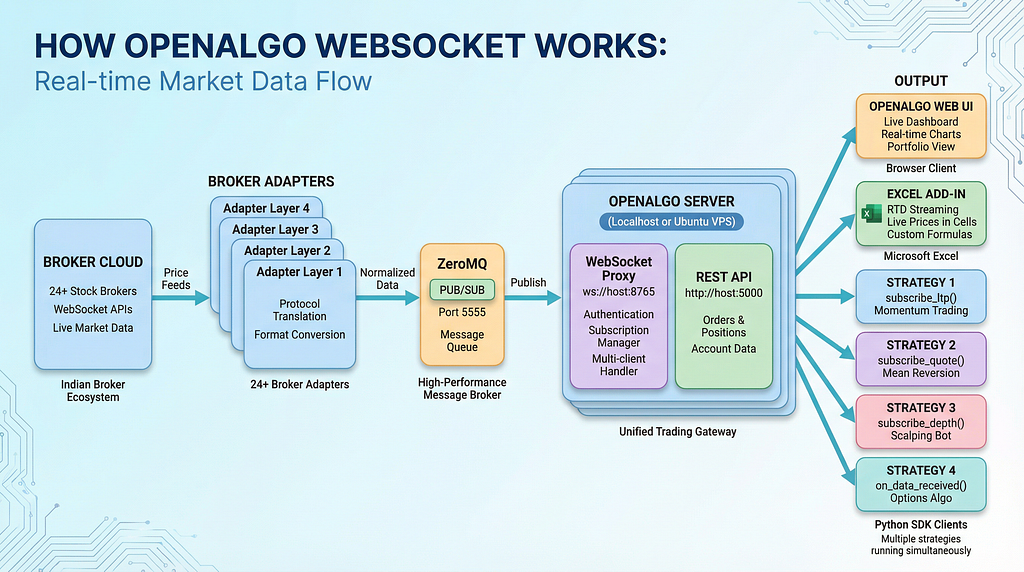
One: Broker Cloud
This is where real time data begins. Each broker offers a WebSocket feed, but every broker sends data in a different style. Some use different authentication rules, some use different symbol formats, and some send different fields.
OpenAlgo supports more than twenty four brokers. They stream:
- LTP which is the last traded price
- Quote data such as open high low close volume and bid ask
- Market depth with five or twenty or fifty levels
Trader view
If you switch brokers you do not have to learn a new API or data format. The output always looks the same through OpenAlgo.
Developer view
You do not need to write separate code for each broker feed. The next layer handles that work.
Two: Broker Adapters
Broker Adapters act as translators. They take the raw broker feed and convert it into one consistent OpenAlgo format.
Tasks performed by an adapter
- Authenticate with the broker
- Connect to the broker WebSocket
- Subscribe to user selected symbols
- Convert broker specific data to the OpenAlgo format
- Publish clean data into the ZeroMQ message bus
Unified data format
You always receive a structured JSON object in one standard format.
Example:
{
  "symbol": "RELIANCE",
  "exchange": "NSE",
  "ltp": 2847.35,
  "open": 2830,
  "high": 2855,
  "low": 2825.5,
  "close": 2832.1,
  "volume": 1250000,
  "bid": 2847.3,
  "ask": 2847.4,
  "timestamp": "2024 01 15T10 30 45.123Z"
}
Trader view
No matter which broker you choose, the data is always clean and uniform.
Developer view
You write your strategy once and use it with any supported broker.
Three: ZeroMQ Message Bus
After the data is normalized it is sent to ZeroMQ which is a fast and lightweight message system.
ZeroMQ offers:
- Very low latency
- Asynchronous data flow
- Publish and subscribe messaging
- Excellent performance even with high message volumes
How the flow works
Adapters publish data into a ZeroMQ topic.
The OpenAlgo server subscribes to all topics.
ZeroMQ delivers the data quickly and efficiently.
Trader view
Charts update instantly and strategies react without delay.
Developer view
ZeroMQ removes complicated networking code and provides a simple high speed message pipeline.
Four: OpenAlgo Server
This is the center of the OpenAlgo ecosystem. It contains two main parts.
A. WebSocket Proxy Server
The WebSocket Proxy distributes real time data to all connected clients such as Python scripts, Excel sheets, or browser dashboards.
It is responsible for:
- User authentication
- Managing subscriptions for each client
- Handling multiple clients at the same time
- Listening to ZeroMQ
- Throttling updates to avoid excessive traffic
B. REST API Server
This part manages:
- Order placement
- Order updates
- Positions and holdings
- Account data
- Historical candles
Trader view
You can run the server on your laptop or on a cloud machine and keep your strategy active through the entire market session.
Developer view
You receive a clear separation between high speed streaming and business logic for orders.
Five: Client Applications
Many different types of clients can consume the OpenAlgo feed at the same time.
OpenAlgo Web Dashboard
The dashboard provides:
- Live charts
- Market watch
- Portfolio and positions
- Order window
- Real time price updates
This is ideal for traders who prefer a visual interface.
Excel Add In with OpenAlgo Functions
The Excel Add In connects Excel directly to the OpenAlgo WebSocket.
It provides custom worksheet functions created solely for OpenAlgo.
It uses a continuous WebSocket connection to keep each cell updated.
Available functions
=oa_ltp("NSE", "RELIANCE")
=oa_quotes("NSE", "NIFTY_INDEX")
=oa_depth("NFO", "BANKNIFTY30DEC25FUT")
Each function subscribes to live data and updates the cell automatically.
What traders can build
- Watchlists
- P & L trackers
- Custom option chain
- Spread sheets
- Scanners
- Risk calculators
- Alerts using Excel formulas
No programming knowledge is needed. If you know Excel you can build powerful real time tools.
Python SDK for Automated Strategies
Here is a simple Python example:
from openalgo import api
client = api(
    api_key="your_api_key",
    host="http://127.0.0.1:5000",
    ws_url="ws://127.0.0.1:8765"
)
def on_update(data):
    print(data["symbol"], data["ltp"])
client.connect()
client.subscribe_ltp(
    [{"exchange": "NSE", "symbol": "RELIANCE"}],
    on_data_received=on_update
)
This can be expanded into advanced strategies for intraday trading, positional trading, option buying, scalping, or market making.
Subscription Modes
You can choose the level of detail needed for your strategy.
LTP Mode
Fastest updates
Ideal for quick alerts and light strategies
Quote Mode
Includes OHLC volume and bid ask
Best for intraday models and chart based strategies
Market Depth Mode
Full order book
Used for scalping order flow and market making
Multiple Strategies at the Same Time
You can run several strategy scripts in parallel. Each client maintains its own WebSocket connection and subscribes to only the symbols it needs.
This provides:
- Complete isolation
- Parallel testing
- Independent risk control
- Smooth scaling
Traders often run a main live strategy while testing a new one in the background.
Performance Features
OpenAlgo includes several internal optimizations.
- Instant lookup subscription indexing
- Throttling to control message flood
- Batch broadcasting for efficiency
- Zero copy transfers inside ZeroMQ
These features ensure that your data remains fast and stable even under heavy load.
Resilience and Error Recovery
The system detects and recovers from issues such as:
- Broker feed disconnect
- Unstable internet
- Client disconnect
The server automatically reconnects and continues streaming once stable.
This keeps your strategies reliable during real market conditions.
Quick Start Python Example
from openalgo import api
import time
API_KEY = "your_api_key"
HOST = "http://127.0.0.1:5000"
WS_URL = "ws://127.0.0.1:8765"
client = api(api_key=API_KEY, host=HOST, ws_url=WS_URL)
prices = {}
def on_ltp(data):
    symbol = data["symbol"]
    prices[symbol] = data["ltp"]
    print(symbol, data["ltp"])
def main():
    instruments = [
        {"exchange": "NSE", "symbol": "RELIANCE"},
        {"exchange": "NSE", "symbol": "INFY"}
    ]
    client.connect()
    client.subscribe_ltp(instruments, on_data_received=on_ltp)
    while True:
        time.sleep(1)
if __name__ == "__main__":
    main()
Conclusion
OpenAlgo delivers consistent and ultra fast real time data to both traders and developers. It removes broker based complexity and provides one unified system for all trading workflows.
Summary for traders
- You can use Excel or the Web UI without any coding
- You get clean and accurate real time data
- You can switch brokers without changing your setup
Summary for developers
- Unified data format across all brokers
- ZeroMQ powered low latency pipeline
- Clean Python SDK for strategy development
- Support for multiple strategies at the same time
OpenAlgo gives you a solid foundation for building reliable trading setups whether you use Excel or Python or a fully automated system.
